The Activity page answers two questions: what happened, and who is behind it. At the top, every chat, inquiry, appointment and request for a human appears in order, and below it the list of your visitors with their interest score and all their visits. This way, you see which visitors come back and how close they are to an inquiry.
At a glance
- You find the page in the LeadWin dashboard under Analytics → Activity.
- The page is available with Pro, Scale and during the trial. Free and Basic see examples.
- The event list shows the 20 newest events of the selected period.
- The visitor list only shows visitors who consented to visitor analytics, and only from the last 90 days.
- Owners, admins and people with the Viewer role can see the page, but not the Agent role. You set the roles under Team.
How it works
The event list reads the same events as the funnel in Visitor analytics, and it does so immediately, not overnight. It contains all chats, inquiries, appointments and requests for a human, including those from visitors without consent. Visit details, meaning origin, page views and location, only appear for visitors with consent. How often your LeadWin agent was seen or opened is deliberately not part of this list.
The visitor list and the visit timelines only exist for visitors who consented to visitor analytics. How to set up consent is explained under Privacy. LeadWin deletes individual visit data after 90 days. Older visits and visitors therefore disappear from the list.
Both lists refresh themselves every 15 seconds, as the pulsing Live at the top right shows.
Read the events
- Open Analytics → Activity.
- At the top, choose 7 days, 30 days or 90 days. The default is 30 days. The period only applies to this page and only to the events, not to the visitor list.
- You see the 5 newest events. With a button such as Show all 12 entries, you expand up to 20, and with Show less you collapse them again.
- Click an event with an arrow to open the conversation in the Inbox.
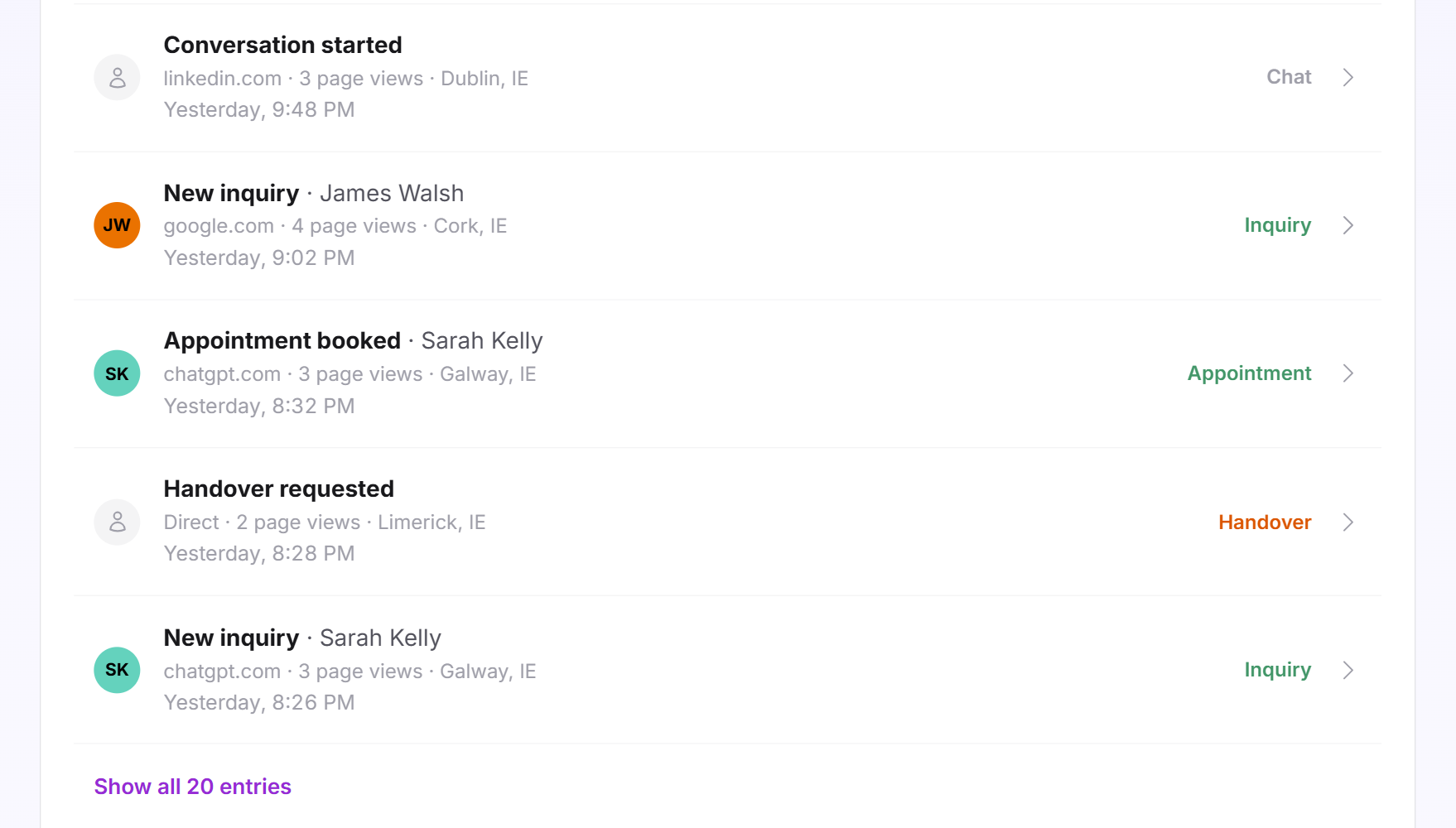
Each row shows on the left the visitor's initials if they left an inquiry with a name in the same conversation, otherwise a neutral person icon. Next to it are the event and the name, below them origin, page views and location, and on the right the time, such as Today or Yesterday with the time of day, and a colored word for the type:
| Event | Type | What happened |
|---|---|---|
| Conversation started | Chat (grey) | A visitor wrote their first message. |
| New inquiry | Inquiry (green) | A visitor left an inquiry. |
| Appointment booked | Appointment (green) | A visitor booked an appointment in the chat. |
| Handover requested | Handover (orange) | A visitor wants to talk to someone from your team. |
| Issue resolved | Resolved (green) | An issue was recorded as resolved. |
A handover only appears if the email notification was turned on in the Inbox at that time. If there is nothing in the period, it says No data in the selected period yet.
Use Visitor activity
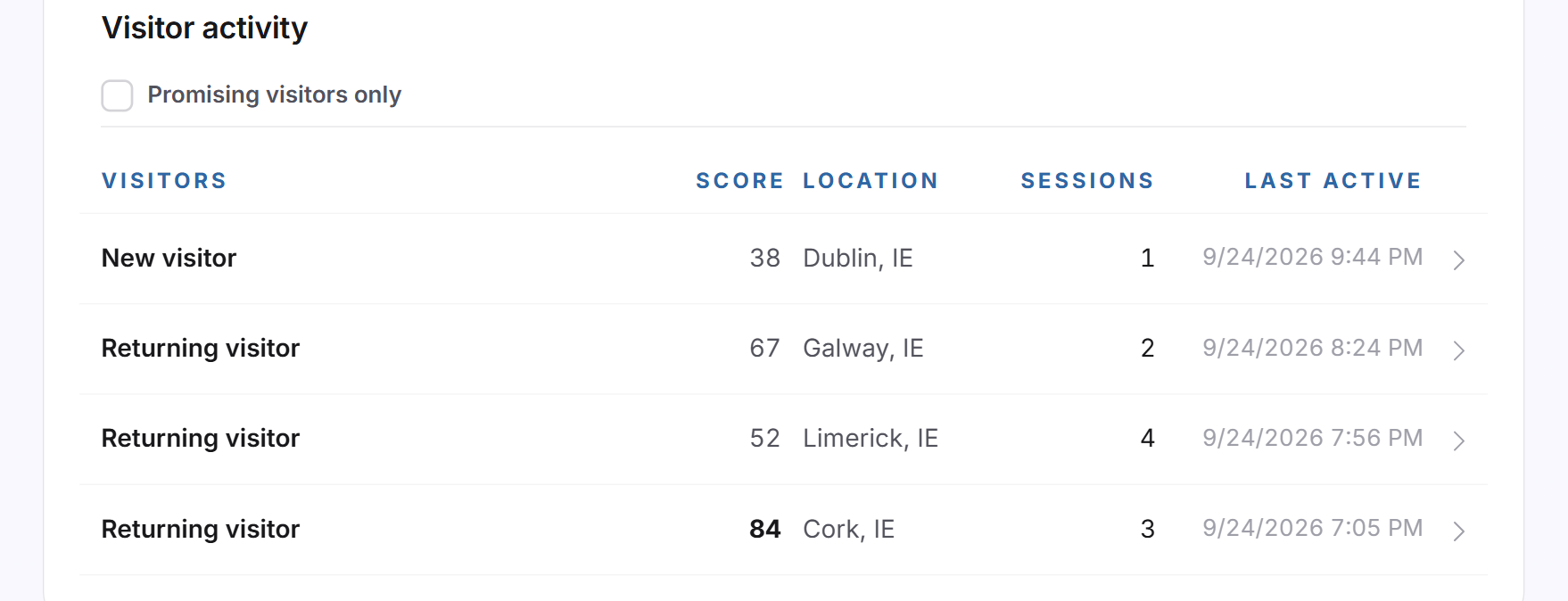
Under Visitor activity are all recorded visitors, the most recently active at the top. The columns are Visitors, Score, Location, Sessions and Last active. A score from 70 appears in bold.
- If needed, tick Promising visitors only. You then only see visitors with a score of 70 or more.
- The list shows 25 visitors. With Load more, you get the next 25.
- Click a visitor. Their Activity timeline expands below. A second click closes it.
The timeline shows the 50 newest visits. For each visit, you see start time, channel such as Organic or AI assistants, the referring website, location and browser. Below that follow the pages read with time spent and scroll depth in percent, and the stages the visitor reached, for example LeadWin opened, First message or Lead qualified. Repeated stages are grouped with ×2, ×3 and so on.
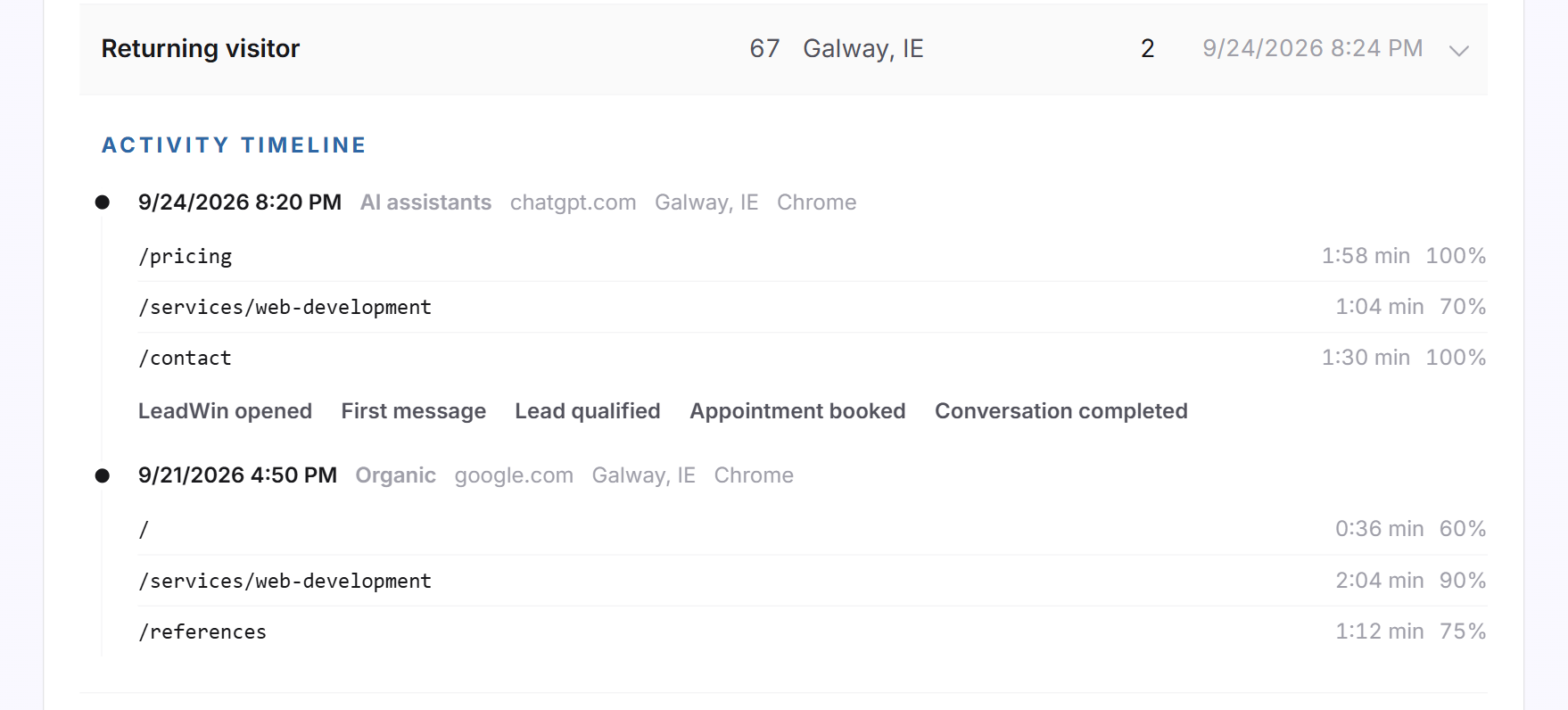
Visitors are called New visitor or Returning visitor. The list currently shows no company names, because LeadWin has no company detection connected. If a visitor has left contact details, you find them by name under Contacts.
How the score is calculated
The score is a visitor's interest score, from 0 to 100. It has nothing to do with reviews. LeadWin calculates it from the current visit and the earlier ones:
- 4 points per page view in the current visit, at most 20.
- 5 points per minute on the website, at most 15.
- 15 points for a page whose address contains kontakt, contact, preis, pricing, angebot, quote or demo.
- 10 points for the second visit, 15 from the fourth.
- The furthest stage in the chat: 10 points for opening, 20 for a message, 25 for an inquiry or more.
From 70 points, a visitor counts as promising. The flame under Live visitors and the email under Notifications use the same threshold.
When your plan does not include the page
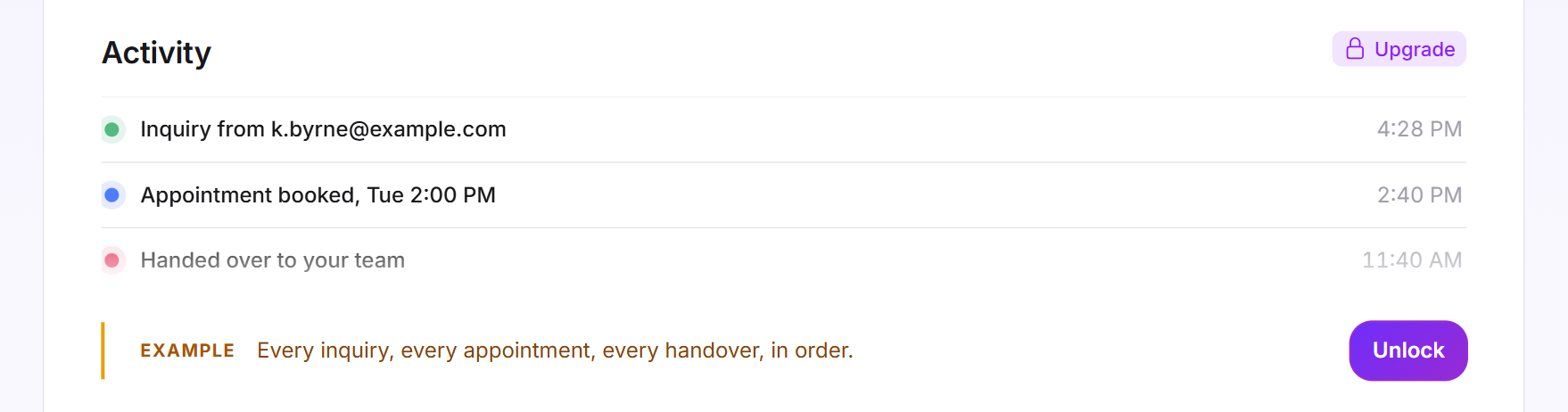
In Free and Basic, two example cards replace the lists. The Activity card shows made-up entries such as an inquiry, a booked appointment and a handover to your team. The Visitor activity card shows three made-up visitors with location and number of visits. Both carry the Example label. Unlock and Upgrade open the LeadWin pricing page, or the Feedbax pricing page with Feedbax Business.
What your plan includes
| Plan | Events | Visitor activity |
|---|---|---|
| Free | example only | example only |
| Basic | example only | example only |
| Pro and trial | the 20 newest per period | yes, 90 days, 50 visits per visitor |
| Scale | the 20 newest per period | yes, 90 days, 50 visits per visitor |
Feedbax Business comes with the limits of Basic, Premium with those of Pro and Enterprise with those of Scale. You find more on this in LeadWin in your Feedbax plan, and all limits in Plans compared.
Pro pays off if you want to know who is behind your numbers: which visitor is reading your pricing page for the third time and when a conversation came out of it. During the trial, you try this out for 7 days. How to switch is explained in Manage, change and cancel your plan.
Frequently asked questions
Why does the visitor list not change when I switch the period?
The period only applies to the events. The visitor list always shows all recorded visitors from the last 90 days, the most recently active at the top.
Why do I only see 20 events?
The list shows the 20 newest events of the period. You find older events in the Inbox, under Inquiries and under Appointments.
How is the score calculated?
From pages read, time spent, repeat visits, visits to contact or pricing pages and activity in the chat. From 70 out of 100, a visitor counts as promising.
Why do the visitors show no company name?
LeadWin currently has no company detection connected. Visitors appear as new or returning.
Why is a visitor I chatted with missing?
Only visitors who consented to visitor analytics appear in the visitor list. Their chat still appears in the event list and in the Inbox.
How long does LeadWin keep visitor data?
90 days. After that, LeadWin deletes the individual visits.
Why is a handover missing from the list?
Handovers only count if the email notification was turned on in the Inbox at that time. Without it, your LeadWin agent does not promise a human in the chat.