

If a LeadWin agent's monthly quota is not enough, you buy extra conversations for exactly this agent, by hand or automatically. This way, your LeadWin agent answers every new inquiry even in a strong month, without you having to change your plan right away. Purchased conversations never expire.
At a glance
- You open the dialog in the LeadWin dashboard via Usage → More conversations.
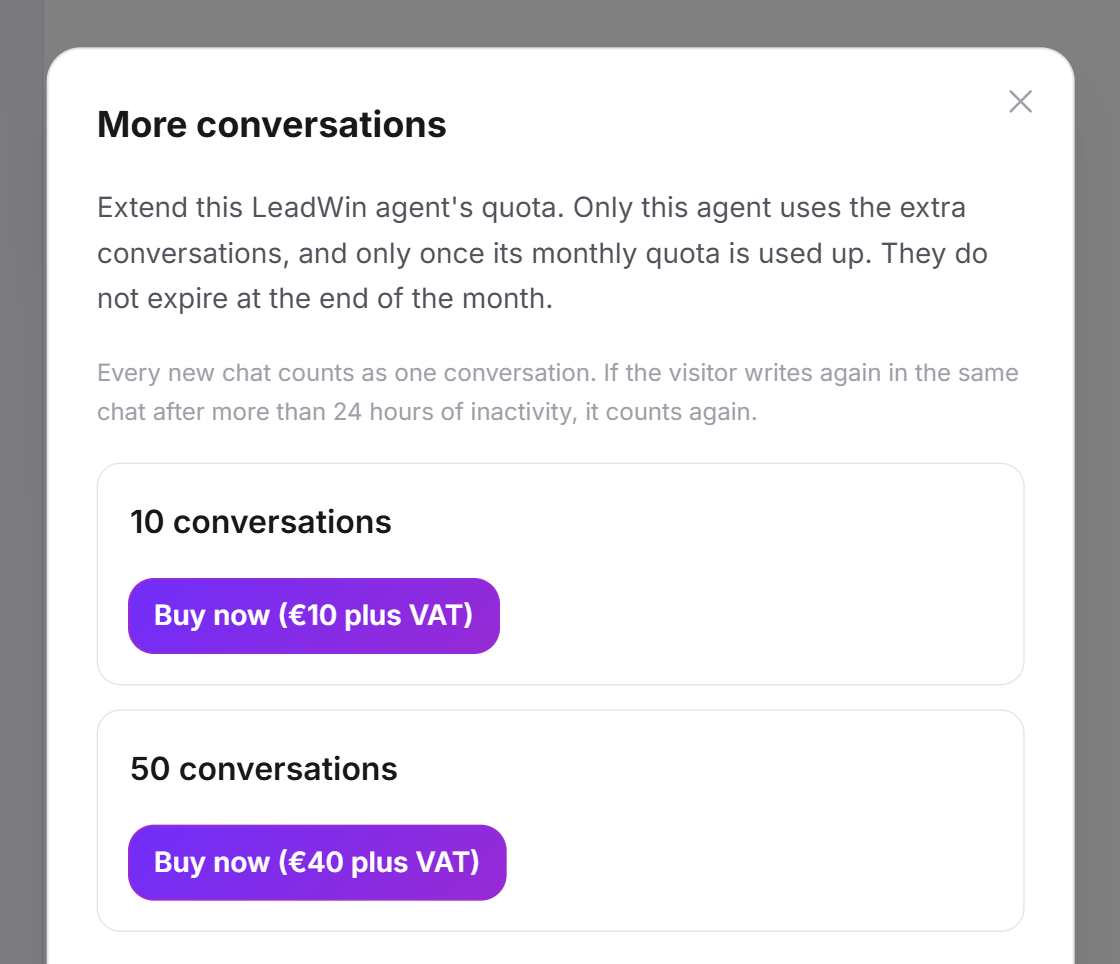
- There are top-up packs with 10 and with 50 conversations. The prices are shown on the pricing page and in the dialog.
- You can buy extra conversations from Basic upwards, that is, with Basic, Pro, Scale and the Feedbax plans Business, Premium and Enterprise. Not on Free and not during the trial.
- A pack belongs to one LeadWin agent. It only uses the pack once its monthly quota is used up.
- Automatic top-up is switched on for every agent: 10 conversations, at most 3 times a month, with an email for every top-up.
How it works
You always buy for the LeadWin agent you currently have open in the LeadWin dashboard. If you have several LeadWin agents, no other agent can use these conversations. So switch to the right agent before you buy.
Your LeadWin agent only uses purchased conversations once its monthly quota is used up. From then on, each new conversation costs one of them. They are counted by the same rule as the quota: each new chat counts once, and the same chat counts again if the visitor continues writing after a 24-hour break. More on this in Usage.
Purchased conversations are not tied to the conversation month. Whatever is left, your LeadWin agent carries over into the next month, with no expiry date. Even after switching to Free, it still uses up its remaining purchased conversations. You cannot buy new packs on Free, though. If you delete a LeadWin agent on the Agent page, its purchased conversations are deleted with it. The delete dialog lists them beforehand under This is what goes:, for example 12 bought conversations not used yet.
Buy a pack by hand
This is how you buy extra conversations with a booked LeadWin plan. You pay with the payment method stored in your plan.
- Open the LeadWin agent you want to buy conversations for.
- Click Usage at the top and then More conversations. If your quota is running low, the card in the bottom left also takes you there via More conversations.
- At the top, the dialog shows how many purchased conversations the agent still has, for example +10 extra conversations.
- For the pack you want, click Buy now. The net price is shown in brackets, with the addition plus VAT for a German billing address.
- LeadWin charges your stored payment method immediately. Done. This LeadWin agent now has more conversations. appears.
VAT depends on the billing address in your plan: with a German address, German VAT is added, with a valid VAT ID from another EU country the reverse charge procedure applies, and outside the EU no German VAT is charged. The pack with 50 conversations is cheaper per conversation than the one with 10. By what percentage is shown on the pricing page under Add-ons.
If your bank has to confirm the payment, declines it or no payment method is stored, the Payment step opens. There you enter your card details, see the net amount and VAT and pay with the button that shows the total. Back takes you back to the packs. If the payment is not confirmed yet afterwards, it says Your payment is being processed. The conversations are credited as soon as the payment is confirmed. If your bank sends you to its own page for the confirmation, you come back to the LeadWin dashboard afterwards, and the message Done. This LeadWin agent now has more conversations. confirms the purchase. If the purchase fails, The purchase did not go through. Please try again. appears. You change the stored payment method of your plan under Manage your plan.
Pay with your Feedbax balance
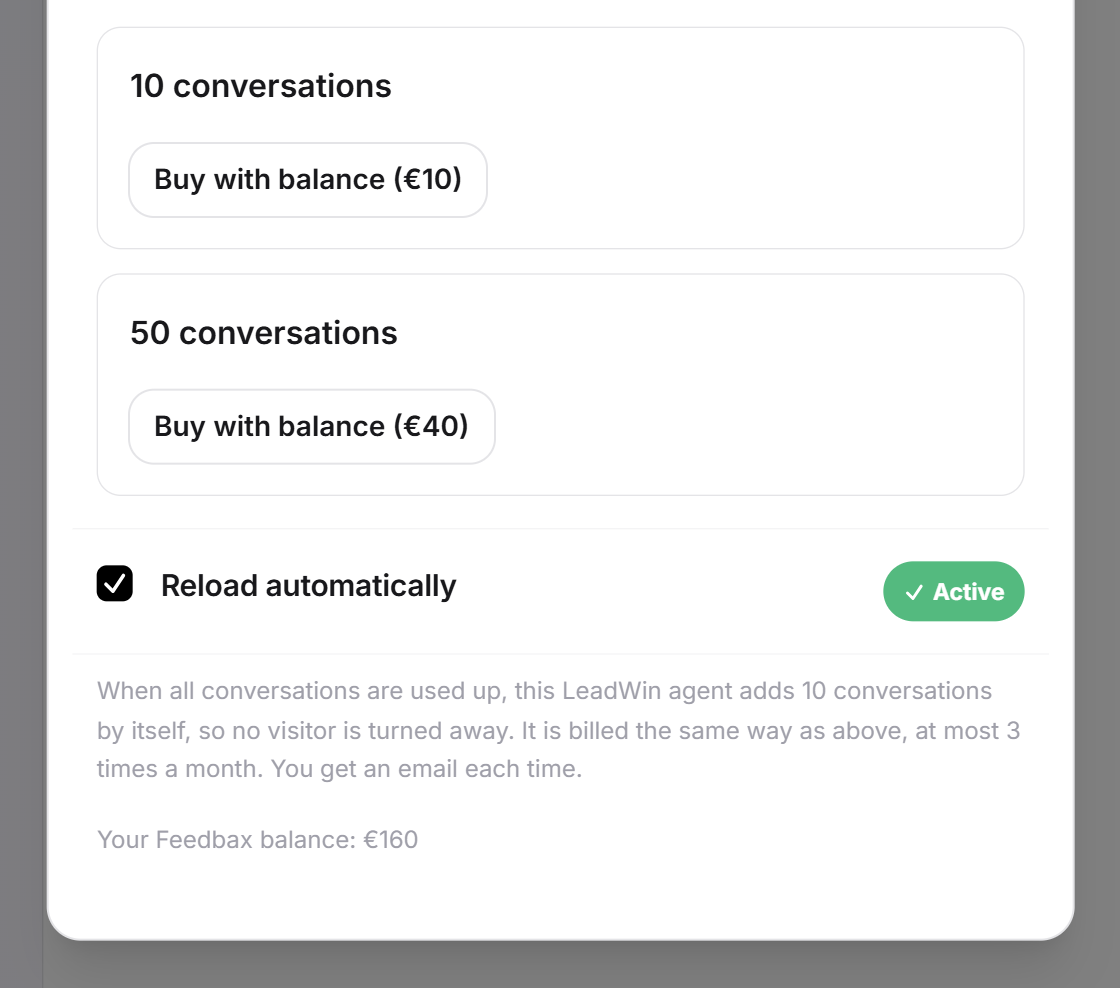
If you have a Feedbax plan, you pay for top-up packs only with your Feedbax balance. The reverse also applies: with a LeadWin plan, you cannot use a Feedbax balance.
- Open Usage → More conversations. The dialog shows your current Feedbax balance.
- For the pack you want, click Buy with balance. The amount of balance it costs is shown in brackets.
- The balance is deducted immediately.
If your balance is not enough, Your balance does not cover this pack. appears. Top up balance opens the Feedbax top-up page in a new tab. When you top up, the top-up bonus of your Feedbax plan applies. More on this in LeadWin in your Feedbax plan.
Top up automatically
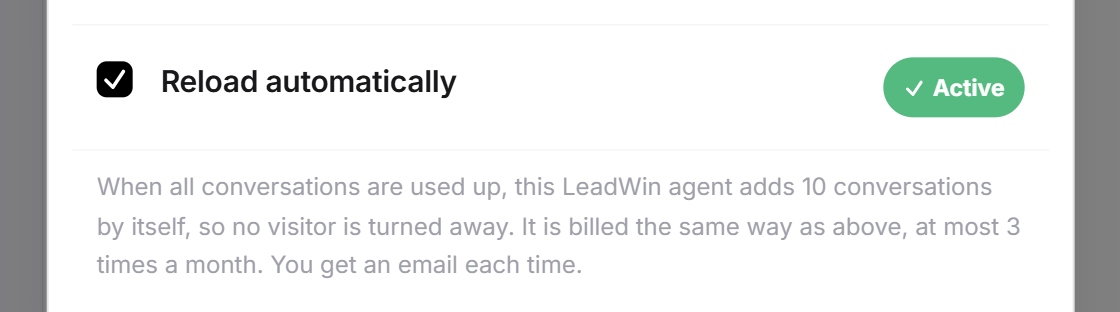
With automatic top-up, your LeadWin agent buys 10 conversations by itself as soon as nothing is left. This way, no visitor is turned away, even if you are not looking at the LeadWin dashboard. These rules apply:
- Automatic top-up is switched on for every LeadWin agent, even if you have never opened the dialog.
- It only starts when the monthly quota and purchased conversations are used up and a visitor begins a new conversation.
- You pay as with a manual purchase: with the payment method of your LeadWin plan or with your Feedbax balance.
- At most 3 times per agent and conversation month, so at most 30 additional conversations. After that, your LeadWin agent turns away new chats as it would without top-up, and you decide yourself.
- If an attempt fails, automatic top-up pauses for 24 hours. A card whose payment the bank first has to confirm also counts as failed. The invoice then remains open and unpaid.
- After every top-up, you receive the email Your LeadWin agent added conversations.
You can switch off automatic top-up for each agent separately:
- Open the LeadWin agent and then Usage → More conversations.
- At the bottom, untick Reload automatically. The setting saves immediately.
If saving fails, the checkbox jumps back and The setting could not be saved. Please try again. appears.
Tip: If your LeadWin agent tops up every month, consider a bigger plan. It raises the quota permanently. You compare the plans in Plans compared.
When a direct debit is returned
If you paid for a pack by direct debit, LeadWin credits the conversations immediately, even before the bank has transferred the money. If the bank later reverses the direct debit, LeadWin takes the whole pack away again, even if you have already used it. You then receive the email Your payment was returned with the invoice number.
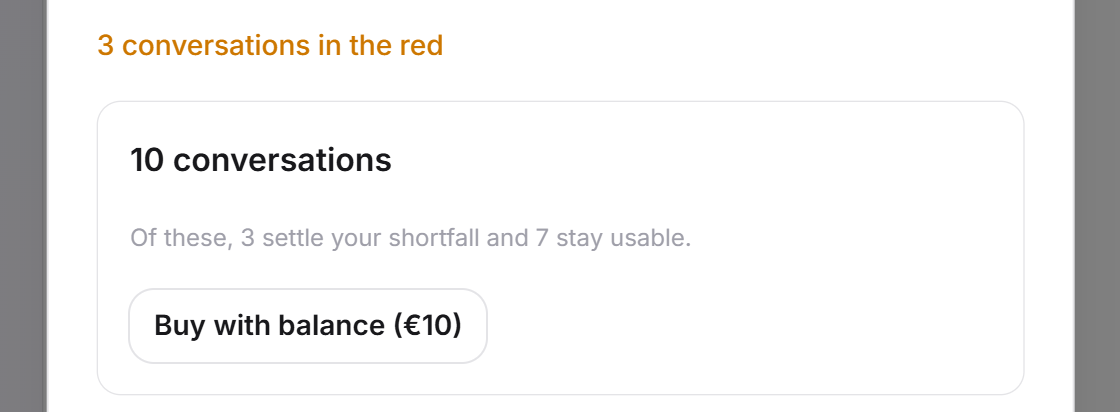
If you had already used the conversations, your LeadWin agent is then in the red. The Usage menu shows, for example, 3 conversations in the red. Your next purchase settles this first. For each pack, the dialog shows beforehand how many conversations go towards settling it and how many you can use afterwards.
What your plan includes
| Plan | Buy by hand | Top up automatically | Payment |
|---|---|---|---|
| Free | no | no | none |
| Trial | no | no | none |
| Basic, Pro, Scale | 10 or 50 conversations | 10 conversations, at most 3 times a month | Payment method of your LeadWin plan |
| Feedbax Business, Premium, Enterprise | 10 or 50 conversations | 10 conversations, at most 3 times a month | Feedbax balance |
Feedbax Business comes with the limits of Basic, Premium with those of Pro and Enterprise with those of Scale. Top-up packs extend a paid quota. On Free and during the trial, you book a plan instead, as described in Book a plan. Even Basic gives you 50 conversations per agent instead of 10, plus the certainty that your LeadWin agent tops up automatically during peaks.
Frequently asked questions
Do purchased conversations expire?
No. They stay with the LeadWin agent until it has used them up.
Can my second agent use conversations I bought for the first one?
No. A pack belongs to the agent you bought it for.
When are purchased conversations used?
Only once the agent's monthly quota is used up. Each further new conversation then costs one.
How do I switch off automatic top-up?
Under Usage → More conversations, untick Reload automatically. This applies to the agent that is open.
How do I pay for a pack?
With a LeadWin plan, via the payment method of your plan, with one click. With a Feedbax plan, via your Feedbax balance.
Why can I not buy extra conversations on Free or during the trial?
Packs extend a paid quota. On Free and during the trial, you book a plan instead.
Why is my agent in the red?
A direct debit for a pack was returned, and the conversations had already been used. Your next purchase settles the shortfall first.
What happens to purchased conversations if I cancel or delete an agent?
After a cancellation, they stay with the agent and are still used on Free. If you delete the agent, they are deleted with it. The delete dialog tells you beforehand how many there are.