
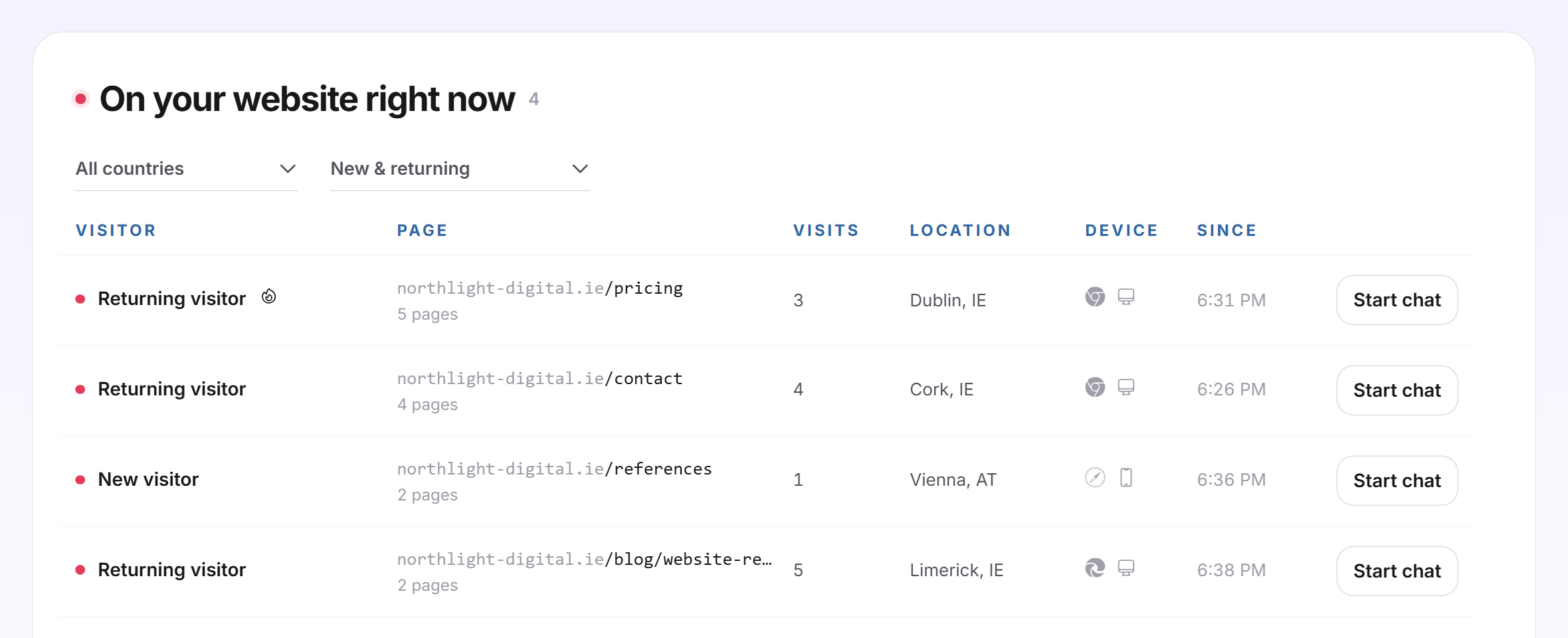
Under Live visitors, you see who is on your website at this very moment: which page they are reading, how often they have been there, where they come from, which device they use and whether they look promising. From each row, you start a chat while the visitor is still on the page. This way, you approach prospects before they leave again.
At a glance
- You find the page in the LeadWin dashboard as a separate area on the left under Live visitors. The pink number on it shows how many visitors are there right now.
- The list is available with Pro, Scale and during the trial. Free and Basic see an example.
- Only visitors who consented to visitor analytics appear.
- A visitor with an interest score of 70 or more out of 100 carries a flame and appears at the top.
- Owners, admins and people with the Viewer role can see the page. Only owners and admins who take over conversations under Team can start a chat.
How it works
Your LeadWin agent reports every 20 seconds that a visitor is still there. If you have the Live visitors page open, it reports every 5 seconds, and the list reloads just as often. If no signal arrives for 45 seconds, the visitor disappears from the list. LeadWin tracks up to 500 visitors at the same time per LeadWin agent.
For someone to appear, three things are needed:
- The code on your website. As long as LeadWin has never seen it on an approved website, the page shows an animated example and the Install the code button. It leads to Installation. Installation only shows the code once the Data processing agreement is concluded. With a sign-up on leadwin.ai it already is, if you came from Feedbax, as a provider or buyer, you accept it once under Privacy. It applies to all agents of your account.
- Your visitors' consent. Without it, LeadWin only counts anonymously, and nobody appears here, not even a simulated visit. The page then shows Set up consent. The button leads to Privacy, where you declare consent for all visitors or report it per visitor from your consent tool through the JavaScript API.
- A plan with the live view: Pro, Scale or the trial.
Your own visits do not appear as long as you are signed in to the dashboard in the same browser. If you want to see how a visitor shows up here, use Simulate a visit.
Read the list
The list has these columns:
- Visitor: a pink dot means active, the page is in the foreground. A grey dot means tab open, the page is still open in the background. If the visitor has left contact details before, their name appears, with their email address below it. Otherwise, it says New visitor or Returning visitor.
- Page: the page they are reading right now. From 2 pages on, the number of pages in the visit appears below it.
- Visits: how often this visitor has been on your website.
- Location and Device: city and country, plus browser and desktop, mobile or tablet.
- Since: the time the visit started.
The list shows 8 visitors. If there are more, a button such as Show 4 more shows the rest. From 2 visitors on, you filter at the top by country (All countries or a country code) and by visitor type (New & returning, New only, Returning only). The list currently shows no company names, because LeadWin has no company detection connected.
Spot promising visitors
For every visitor with consent, LeadWin calculates an interest score from 0 to 100. From 70, the row carries a flame and the visitor appears at the top of the list. When you hover over the flame, you see the score, for example High interest (score 84). The score is made up like this:
- 4 points per page view in the current visit, at most 20.
- 5 points per minute on the website, at most 15.
- 15 points for a page whose address contains kontakt, contact, preis, pricing, angebot, quote or demo.
- 10 points for the second visit, 15 from the fourth.
- Depending on how far they got in the chat: 10 points for opening your LeadWin agent, 20 for a message, 25 for an inquiry. Only the furthest stage counts.
A detected company would add 10 points. This detection is currently not connected. There are never more than 100 points.

Activity shows you the same score for all recorded visitors. If you want LeadWin to alert you to such visitors by email, turn on Notifications.
Start a chat
- In the visitor's row, click Start chat.
- The conversation opens in the Inbox, already taken over by you, with the reply field.
- Write your first message and send it. Only then does the chat open for the visitor, with your message.
Until your first message, the visitor notices nothing. If there is already a chat for this visit, the button is called View conversation and opens it. If someone else from your team already holds the conversation, nothing opens. People with the Viewer role do not see the button.
Learn more about a visitor
Click a row. If the visitor is a known contact, their contact opens with all inquiries, appointments and chats. If they are still unknown, a view opens with the details their consent allows: Website visits, Score, Location and First visit. Below that, the Activity timeline lists every visit with start time, origin and device and every page read with the time spent on it. The pages they currently have open are at the top. The view refreshes every 5 seconds.
Simulate a visit
If the list is empty, you can simulate a visit as the account owner. This shows you how a visitor appears here and how your LeadWin agent looks on a website.
- Below the empty list, click Simulate a visit.
- A sample website opens below the list, running your LeadWin agent with your settings. Shortly afterwards, your visit appears in the list, with the page /simulation.
- Try out the chat at the bottom right of the sample website.
- While the simulation runs, the bar above the sample website says A simulated visit is running. It counts like any other. End it when you are done. Click End the simulation next to it when you are done.

A simulated visit counts in Visitor analytics like a real visit. However, it never counts as an installation of your code. The simulation also needs consent under Privacy. People from your team do not see the button.
When the page is locked or empty
The page always shows exactly one of four states:
- Locked: In Free and Basic, you see faded sample rows with the Example label. Unlock and Upgrade open the LeadWin pricing page, or the Feedbax pricing page with Feedbax Business.
- Not installed yet: an animated example under In real time, three benefits under This is what you are missing: and Install the code.
- No consent: a notice and Set up consent.
- The list: with visitors or with the notice Nobody with consent is browsing your website right now.

What your plan includes
| Plan | Live visitors |
|---|---|
| Free | example only |
| Basic | example only |
| Pro and trial | yes, up to 500 visitors at the same time |
| Scale | yes, up to 500 visitors at the same time |
Feedbax Business comes with the limits of Basic, Premium with those of Pro and Enterprise with those of Scale. You find more on this in LeadWin in your Feedbax plan, and all limits in Plans compared.
Pro pays off if you do not want to wait until a visitor writes. You see who is reading your pricing page right now and approach them while they are still there. During the trial, you try this out for 7 days. How to switch is explained in Manage, change and cancel your plan.
Frequently asked questions
Why is the list empty although I have visitors?
Only visitors who consented to visitor analytics appear. Check under Privacy whether consent is set up. Without it, LeadWin only counts anonymously.
Why do I not see myself when I open my website?
LeadWin does not count visits from your signed-in browser. Use Simulate a visit.
What does the flame mean?
A promising visitor with an interest score of 70 or more out of 100. The score comes from pages read, time spent, repeat visits, visits to contact or pricing pages and activity in the chat.
What happens when I click Start chat?
The conversation opens in your Inbox, and you reply. The visitor sees nothing until you send your first message.
What is the difference between active and tab open?
Active means the page is in the foreground. Tab open means it is still open in the background.
How long does a visitor stay in the list after leaving?
About 45 seconds.
Does the simulated visit distort my numbers?
It counts in Visitor analytics like a normal visit. It does not count as an installation of your code.
Why do I not see company names?
LeadWin currently has no company detection connected. Visitors therefore appear as new or returning until they leave contact details.