

Each LeadWin agent has a conversation quota for the month. Your plan determines how large it is. In the Usage menu, you see at any time how many conversations have been held and how much of the other limits is in use. This way, you notice early when you should buy more or switch to a bigger plan.
At a glance
- Conversations per month per LeadWin agent: Free 10, trial 30, Basic 50, Pro 100, Scale 250. All limits are listed in Plans compared.
- A conversation is a new chat, no matter how many messages it has. If the visitor writes again in the same chat after a 24-hour break, it counts once more.
- Test conversations in the live preview never count against the quota. They have their own budget.
- You find your usage at the top of the LeadWin dashboard under Usage. Owners and admins can see the menu.
- Once everything is used up, your LeadWin agent no longer answers new chats until the next month begins, you buy more conversations or it tops up by itself.
How it works
A conversation counts as soon as a visitor writes their first message in a chat. All further messages in this chat cost nothing. Only if the visitor has not written anything for 24 hours or longer and then continues in the same chat does another conversation count. Not counted are the answers of your LeadWin agent, the replies of your team in the inbox and all test conversations in the live preview. The inbox separates conversations by the same rule. What you see there is therefore what is counted.
The quota applies to each LeadWin agent separately. Two agents on the Pro plan have 100 conversations each. Extra conversations you buy always belong to the agent you bought them for. More on several agents in Several LeadWin agents.
For each new conversation, LeadWin checks in this order:
- If some of the agent's monthly quota is left, the conversation is deducted from it.
- Otherwise, one of this agent's purchased conversations is used. The counter keeps running, which is why it can show 53 / 50, for example.
- If those are used up too and automatic top-up is on, the agent buys 10 conversations by itself, at most 3 times a month. This is available from Basic upwards, see Buy more conversations.
- Otherwise, the visitor receives a neutral note instead of an answer.
Protective limits against misuse
In addition to the quota, three fixed limits apply. They protect your quota from bots and automated requests. Real visitors practically never reach them.
- 50 messages per chat: A visitor cannot write more in one session. After that, they see You have reached the message limit for this session. Please try again later.
- 200 messages per hour is what a LeadWin agent accepts from the same IP address. That is enough even for several colleagues in one office.
- Messages per month: Per agent and month, at most 50 messages per conversation of the quota are allowed, for example 2,500 on the Basic plan. Once this limit is reached, the visitor receives the same neutral note as when the quota is used up. This costs no conversation and does not trigger a top-up.
Read the Usage menu
- At the top of the LeadWin dashboard, the Usage button shows a small bar and the conversations of the agent you are currently editing, for example 37 / 50. The bar is black, yellow from 80% and red from 100%.
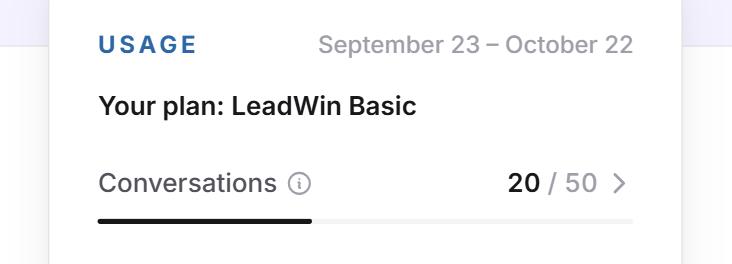
- Click it. At the top, you see the period of the current conversation month. Below it, a line names your plan, for example Your plan: LeadWin Basic or, with a Feedbax plan, Your plan: Feedbax Business. During the trial, the trial block stands there instead.
- The Conversations row shows usage and quota. When you hover over it, the counting rule appears. A click opens the inbox. If you bought extra conversations, it shows, for example, +10 extra conversations below it.
- The Live preview row shows your test messages this month. Once you have used half of the daily budget, it shows, for example, Today: 60 of 100 below it.
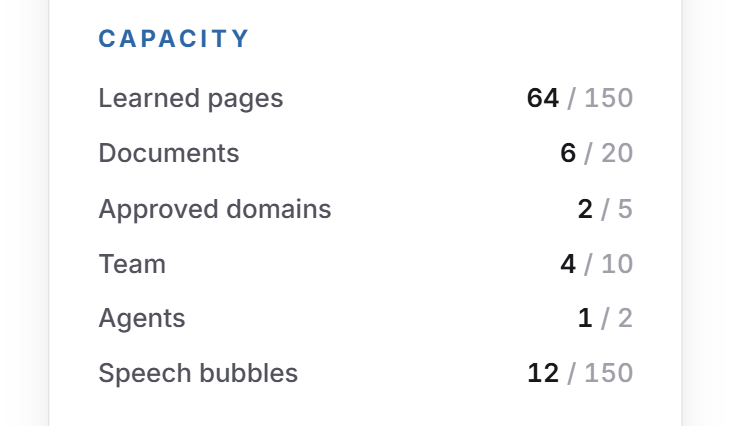
- Under Capacity, every other limit is listed with usage and maximum: Deepened pages, Documents, Approved domains, Team, Agents and, from Pro and during the trial, the automatic Speech bubbles. Social media is collapsed and shows 0 / 1 or 1 / 1 per network. Full limits appear at the top. A click on a row opens the matching page.
- From Basic upwards, the More conversations button follows. At the very bottom, you see Manage subscription if you have booked a LeadWin plan, otherwise Compare plans. More on this in Manage, change and cancel your plan.
When your conversation month begins
The conversation month does not follow the calendar month but a fixed day of the month. Which day that is depends on your plan:
- Booked LeadWin plan: your billing day. Even with yearly billing, you get the quota anew every month, not once for the whole year.
- Free and Feedbax plans: the day your trial ended. If there was no trial, the day you created your first LeadWin agent.
- Trial: the Usage menu shows the 7 days of the trial as the period. A new conversation month begins when it ends.
The month begins in German time. If the day falls on the 31st, the month begins on the last day in shorter months. At the start, all counters are at 0. Unused conversations of the quota expire, purchased conversations remain. If you switch to a bigger plan in the middle of the month, the quota rises immediately. The conversations already counted remain, and the billing day does not change.
When the quota is running low
LeadWin warns you in two places:
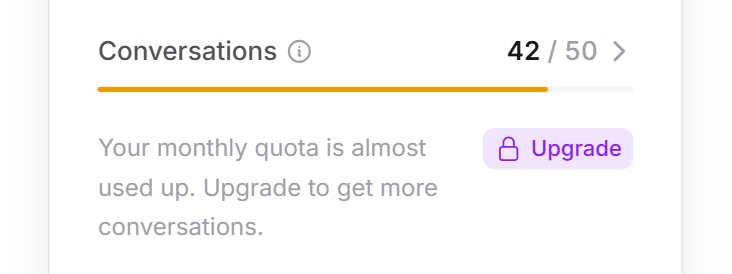
- In the Usage menu, the bar turns yellow from 80%. Below it, a note says that your monthly quota is almost used up, with the Upgrade label. It leads to the pricing page, or with a Feedbax plan to the Feedbax pricing page. On the Scale plan and with Feedbax Enterprise, there is no bigger plan. There, the note says that you are on the biggest plan and points to More conversations.
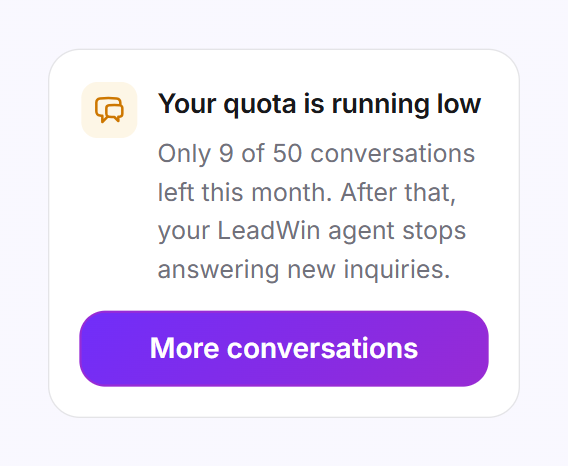
- In the bottom left of the LeadWin dashboard, the Your quota is running low card appears as soon as only 20% or less is left. Purchased conversations count here too. The card says how many conversations remain. From Basic upwards, it leads to More conversations, on Free and during the trial to Upgrade now.
If you have bought extra conversations, the two places can look different: the menu only calculates with the monthly quota, the card with everything that is left.
When the quota is used up
If nothing is left and your LeadWin agent does not top up by itself, the red Monthly quota used up card appears in the bottom left. From Basic upwards, you buy more immediately via More conversations. On Free and during the trial, you book a plan via Upgrade now.
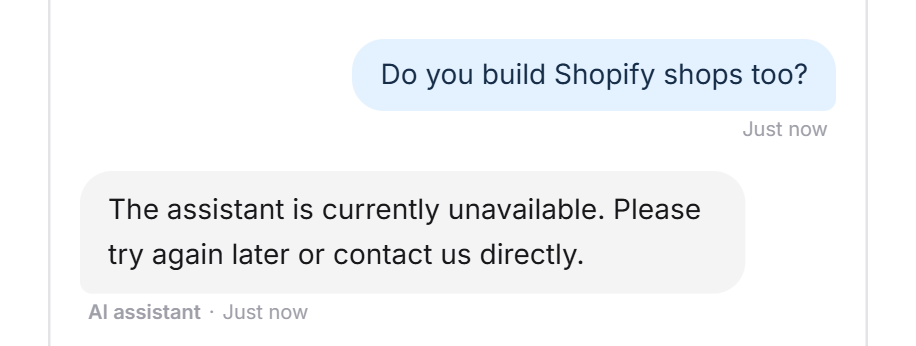
Until then, every visitor who starts a new chat receives this note instead of an answer: The assistant is currently unavailable. Please try again later or contact us directly. If you chose the formal form of address for your LeadWin agent, the sentence appears in its formal version. You set the form of address under Instructions. A chat in which the visitor last wrote less than 24 hours ago continues, because it is not a new conversation.
Tip: Leave automatic top-up switched on. Your LeadWin agent then does not turn away any visitor just because the quota ran out a few days before the end of the month. You get an email with every top-up. If the quota is not enough every month, consider a bigger plan. It raises the limit permanently.
The live preview budget
Test conversations in the live preview never cost a conversation. So that they still stay limited, each LeadWin agent has its own budget of test messages, per month and per day. The day begins at midnight German time. Once the budget is used up, the live preview replies with a note instead of an answer. Your real visitors do not notice any of this.
- Daily budget used up: The live preview shows You have used up the preview for today. Your conversations with real visitors are untouched, and you can carry on testing here tomorrow.
- Monthly budget used up: The live preview shows You have used up the preview for this month. Your conversations with real visitors are untouched, and you can carry on testing here from the next billing month. This means your next conversation month.
What your plan includes
All figures apply per LeadWin agent and conversation month.
| Plan | Conversations | Maximum messages | Test messages per month (per day) | Buy extra and top up automatically |
|---|---|---|---|---|
| Free | 10 | 500 | 30 (20) | no |
| Trial | 30 | 1,500 | 250 (100) | no |
| Basic | 50 | 2,500 | 150 (100) | yes |
| Pro | 100 | 5,000 | 250 (100) | yes |
| Scale | 250 | 12,500 | 400 (100) | yes |
Feedbax Business comes with the limits of Basic, Premium with those of Pro and Enterprise with those of Scale. You find more on this in LeadWin in your Feedbax plan. A bigger plan pays off as soon as your LeadWin agent regularly hits the limit before the end of the month: Pro offers twice as many conversations as Basic, Scale two and a half times as many as Pro. A booked plan applies immediately, see Book a plan.
Frequently asked questions
What counts as a conversation?
Each new chat counts once, no matter how many messages it has. The same chat only counts again if the visitor continues writing after a 24-hour break.
Do my tests in the live preview count?
No. The live preview has its own budget per agent, for example 150 test messages per month with Basic.
Do my agents share the quota?
No. Each LeadWin agent has the full quota of its plan. Purchased conversations belong to one agent.
When does my quota start over?
Every month on your billing day. Without a booked LeadWin plan, on the day your trial ended or your first agent was created. The Usage menu shows the current period.
What do visitors see when everything is used up?
A neutral note that the assistant is currently unavailable, asking them to try again later or get in touch directly. Ongoing chats continue.
Do unused conversations carry over to the next month?
Conversations from your plan do not. Purchased conversations, on the other hand, never expire.
I pay yearly. Do I get the quota for the whole year?
No. The quota renews every month. Yearly billing only sets the day of the month.
Why does my counter show more than the quota, for example 53 / 50?
Your LeadWin agent paid for the conversations above 50 with purchased or automatically topped-up conversations.