

If you are a provider on Feedbax and have the Feedbax plan Business, Premium or Enterprise, LeadWin is already included at no extra cost. You do not book a LeadWin plan on top and start right away with the limits and features that come with your Feedbax plan. You pay for extra conversations with your Feedbax balance.
At a glance
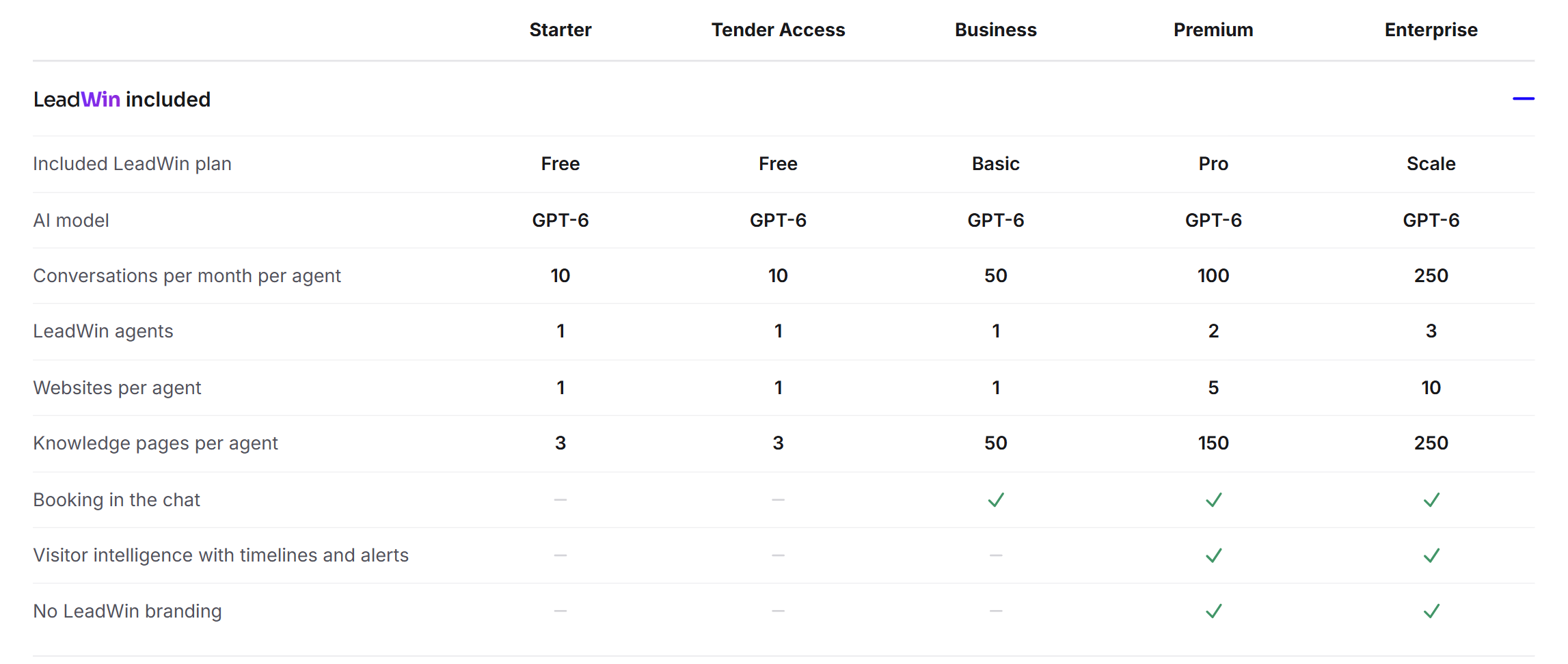
- Feedbax Business includes LeadWin Basic, Premium includes Pro and Enterprise includes Scale. The limits per plan are listed in Plans compared.
- This applies to LeadWin accounts linked to a provider profile on Feedbax. A LeadWin-only account on leadwin.ai has no Feedbax plan.
- With a Feedbax plan, there is no trial, no additional LeadWin plan and no extra agents.
- You buy more conversations in the LeadWin dashboard with your Feedbax balance.
- You book and manage your Feedbax plan at Feedbax, not in the LeadWin dashboard.
How it works
You sign in to LeadWin with your Feedbax login. How to get from the Feedbax dashboard to LeadWin is explained in From Feedbax to LeadWin. On every request, LeadWin checks your Feedbax plan first, even before a LeadWin plan or a trial. What counts is the tier of your provider profile on Feedbax, not the date of your last payment. If your Feedbax plan is renewed by direct debit, the bank often only collects the payment 5 to 8 days after the end of the period. During this time, you keep LeadWin in full.
The mapping is one to one: with Business, each LeadWin agent has the same limits as with LeadWin Basic, with Premium the same as with Pro and with Enterprise the same as with Scale. The Feedbax tiers Starter and Tender Access include LeadWin Free.
Feedbax plans run yearly or quarterly. The LeadWin dashboard has no billing date for them. Your conversation month therefore begins on the day you created your first LeadWin agent. If you had a trial before, it begins on the day the trial ended. How conversations are counted is explained in Usage.
Where you see your Feedbax plan in the LeadWin dashboard
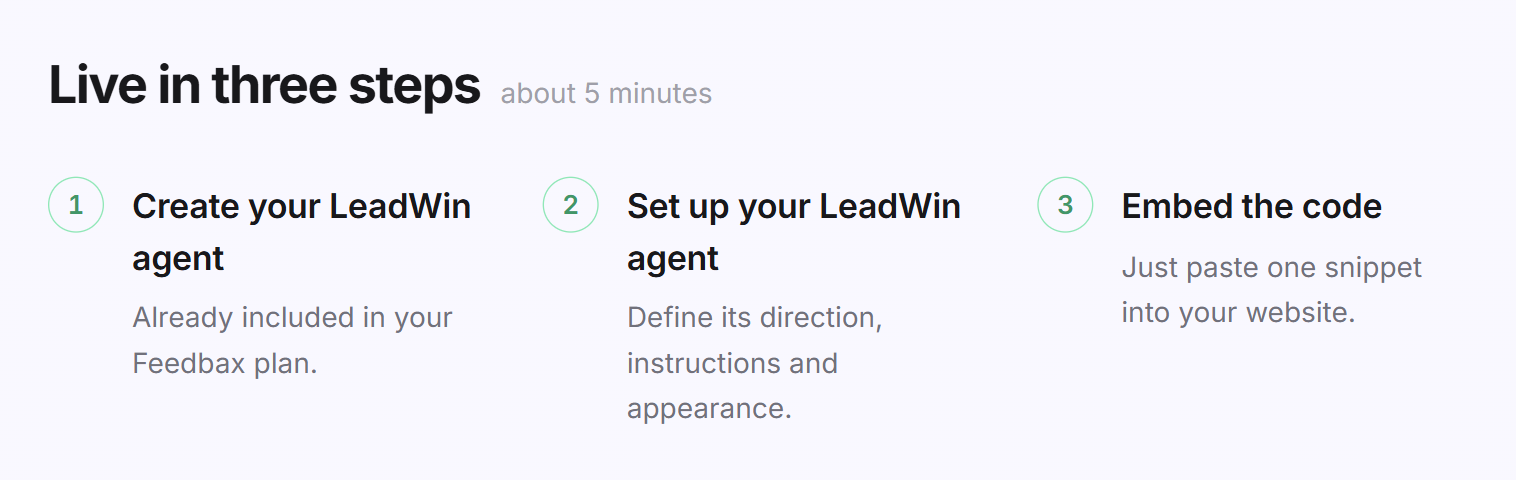
- When creating an agent: If you do not have a LeadWin agent yet, the creation screen shows the Create your LeadWin agent button instead of the trial. Below the first step it says Already included in your Feedbax plan.
- In the Usage menu: Your Feedbax plan appears at the top, for example Your plan: Feedbax Premium, with the limits of your LeadWin agent below it. At the bottom, it says Compare plans, because you do not manage a LeadWin plan of your own. The button opens the Feedbax pricing page.
- In the Switch agent menu: Once you have created as many agents as your plan allows, the menu names the next Feedbax plan. With Business it says Feedbax Premium lets you run 2 agents., with Premium Feedbax Enterprise lets you run 3 agents. With Enterprise there is no note, because there is no higher Feedbax plan.
- In the account menu: It says Upgrade subscription. This entry also opens the Feedbax pricing page.
- For locked features: Clicking Upgrade opens the Feedbax pricing page. There you book the next higher Feedbax plan, and with it the next higher LeadWin plan.
Find the next higher plan
The bigger LeadWin plan always comes with the bigger Feedbax plan. This is how you find it:
- While signed in, open the LeadWin pricing page at leadwin.ai/pricing.
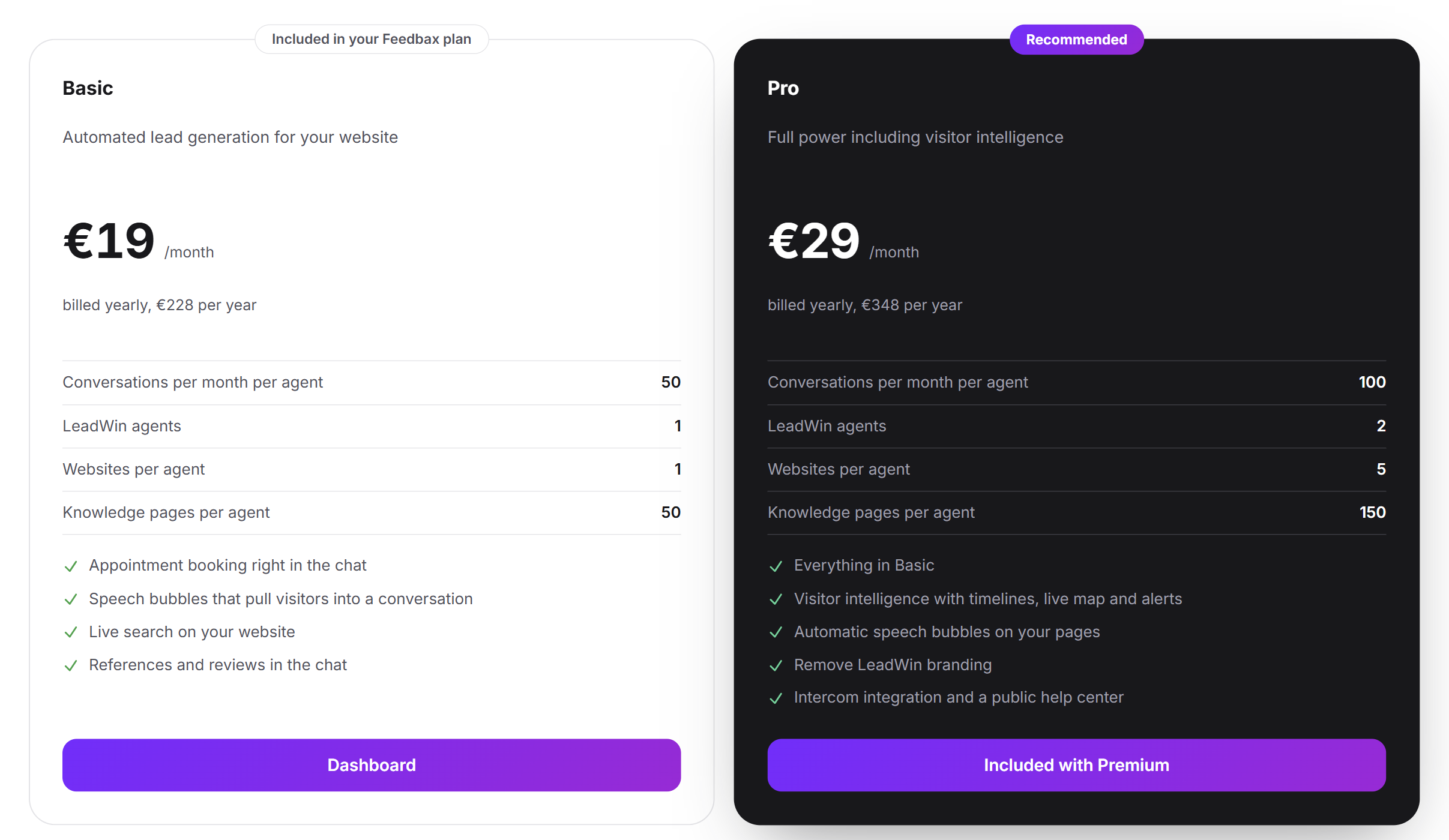
- The cards your Feedbax plan already includes carry the label Included in your Feedbax plan at the top. Their Dashboard button leads to the LeadWin dashboard.
- The higher cards say Included with Premium or Included with Enterprise. Clicking takes you further down to the Feedbax plans.
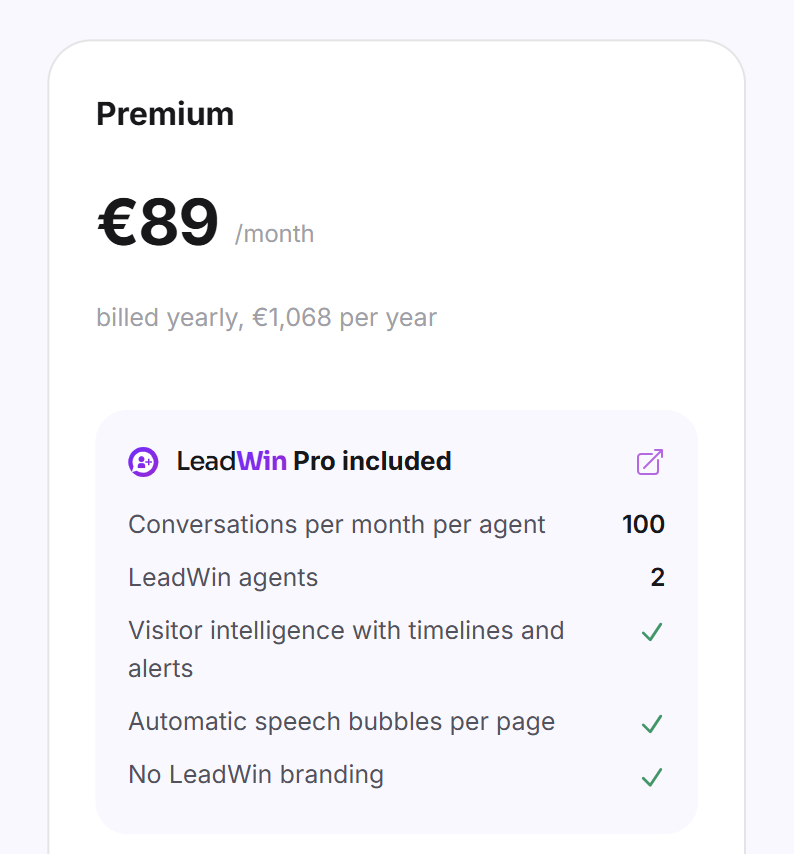
- Each Feedbax plan card shows the price, the included LeadWin plan with its key figures and the benefits in the Feedbax directory. At the top, you choose Quarterly or Yearly. Your current plan is marked Your subscription.
- Click Details and booking. The booking itself takes place on the Feedbax pricing page. Compare all Feedbax plans also takes you there.
On the Feedbax pricing page, the comparison of all features has its own section LeadWin included. The row Included LeadWin plan names the matching LeadWin plan for each Feedbax plan, followed by conversations, agents, websites, knowledge pages, appointment booking and visitor intelligence.
Buy more conversations with your Feedbax balance
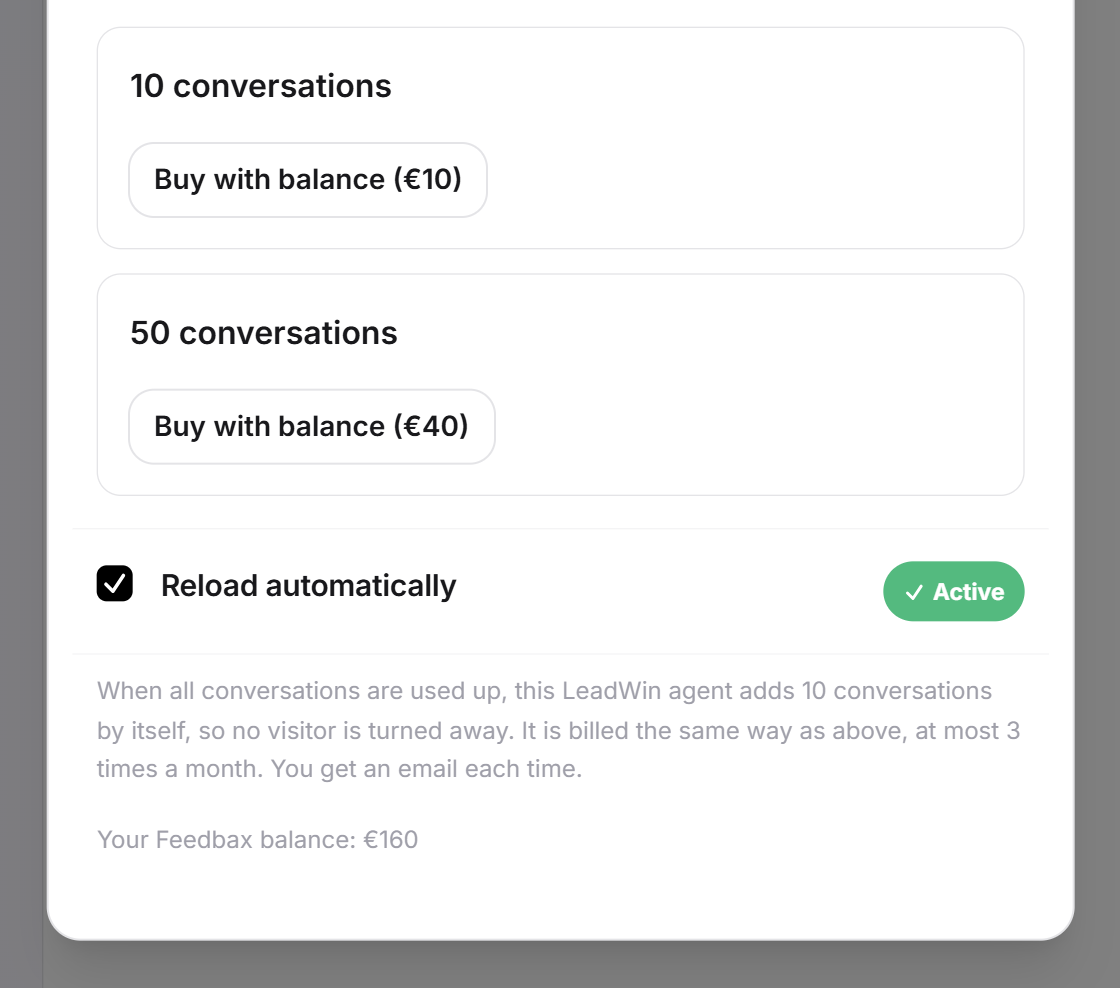
If a LeadWin agent's monthly quota is not enough, you buy top-up packs with 10 or 50 conversations. With a Feedbax plan, you pay for them only with your Feedbax balance. A card is not possible for this.
- In the LeadWin dashboard, click Usage at the top and then More conversations.
- The dialog shows your current Feedbax balance.
- For the pack you want, click Buy with balance. The amount of balance the pack costs is shown in brackets.
- The balance is deducted immediately, and the conversations are available to this LeadWin agent.
If your balance is not enough, Your balance does not cover this pack. appears. Top up balance opens the Feedbax top-up page in a new tab. When you top up, the top-up bonus of your Feedbax plan applies: 20% with Business, 60% with Premium and 100% with Enterprise. Your LeadWin agent also pays for automatic top-ups with your balance. Everything about this is in Buy more conversations.
What you cannot add
A Feedbax plan and a LeadWin plan exclude each other, in both directions. Otherwise, you would pay for LeadWin twice.
- No additional LeadWin plan: If you open the booking of a LeadWin plan while you have a Feedbax plan, You already have another plan appears. The note gives the address of our support team. Write to us, and we will switch your plan for you. More on this in Book a plan.
- No Feedbax plan on top of a LeadWin plan: If a LeadWin plan is already running, the Feedbax plans are locked. Here too, a switch is only possible via support.
- No extra agents: Enterprise includes 3 LeadWin agents. Additional agents are only available with a booked LeadWin Scale plan, up to 2 there, so at most 5 per account. More on this in Several LeadWin agents.
- No trial: Your Feedbax plan already includes LeadWin. Your trial therefore remains unused.
When your Feedbax plan ends
As long as your provider profile has the tier Business, Premium or Enterprise, LeadWin stays included. If it falls back to Starter, LeadWin switches to Free. If you have never used the trial, you can still start it then. Nothing is deleted: all content remains, you just cannot add anything beyond the limits of Free. Agents beyond the first are closed, team members beyond the first seat lose access, and features Free does not include stop working. With a new Feedbax plan, everything is back.
Conversely, LeadWin never touches your Feedbax plan. If you delete your LeadWin account under Account, your Feedbax profile and your Feedbax plan remain. Only LeadWin is deleted.
What your plan includes
| Feedbax plan | Included LeadWin plan | Conversations per month per agent | LeadWin agents | Websites per agent | Team seats per agent | Visitor intelligence |
|---|---|---|---|---|---|---|
| Starter and Tender Access | Free | 10 | 1 | 1 | 1 | no |
| Business | Basic | 50 | 1 | 1 | 3 | no |
| Premium | Pro | 100 | 2 | 5 | 10 | yes |
| Enterprise | Scale | 250 | 3 | 10 | 25 | yes |
All other limits and features follow the included LeadWin plan. The step from Business to Premium pays off particularly for LeadWin: Premium brings visitor intelligence, that is, who visits your website and how interested someone is, plus a second LeadWin agent, twice as many conversations, custom speech bubbles for every page and LeadWin without branding.
Feedbax score
Your Feedbax plan determines how visible you are in the Feedbax directory. Business brings a top placement, better visibility than Tender Access and the integration of Trustpilot and ProvenExpert into your Feedbax profile. Premium brings more visibility than Business and integrates all review sources. Enterprise brings the highest visibility. The included LeadWin plan and your use of LeadWin, on the other hand, affect neither your Feedbax score nor your placement.
Frequently asked questions
I have Feedbax Business. Do I have to pay extra for LeadWin?
No. Business includes LeadWin Basic, Premium includes Pro and Enterprise includes Scale.
Can I add LeadWin Pro to my Business plan?
No. The next LeadWin plan comes with the next Feedbax plan. Pro is part of Premium.
How do I pay for extra conversations?
With your Feedbax balance, under Usage → More conversations. When you top up your balance, the top-up bonus of your Feedbax plan applies.
Why is there no trial for me?
Your Feedbax plan already includes LeadWin. A trial would not unlock anything extra for you.
My direct debit for Feedbax comes later. Do I lose LeadWin?
No. LeadWin follows the tier of your provider profile, not the payment date.
Can I book additional agents with Feedbax Enterprise?
No. Enterprise includes 3 LeadWin agents. Additional agents are only available with a booked LeadWin Scale plan, and even there at most 2, so up to 5 per account.
What happens to LeadWin if I end my Feedbax plan?
As soon as your provider profile falls back to Starter, LeadWin continues on the Free plan. Your content remains, and surplus agents are closed.
Where do I manage my Feedbax plan?
At Feedbax, not in the LeadWin dashboard. The Manage subscription button in the LeadWin dashboard is only there for booked LeadWin plans.